Start
Quick start
Three steps from a repository name to a map you can walk. No account and no API key.
- 1
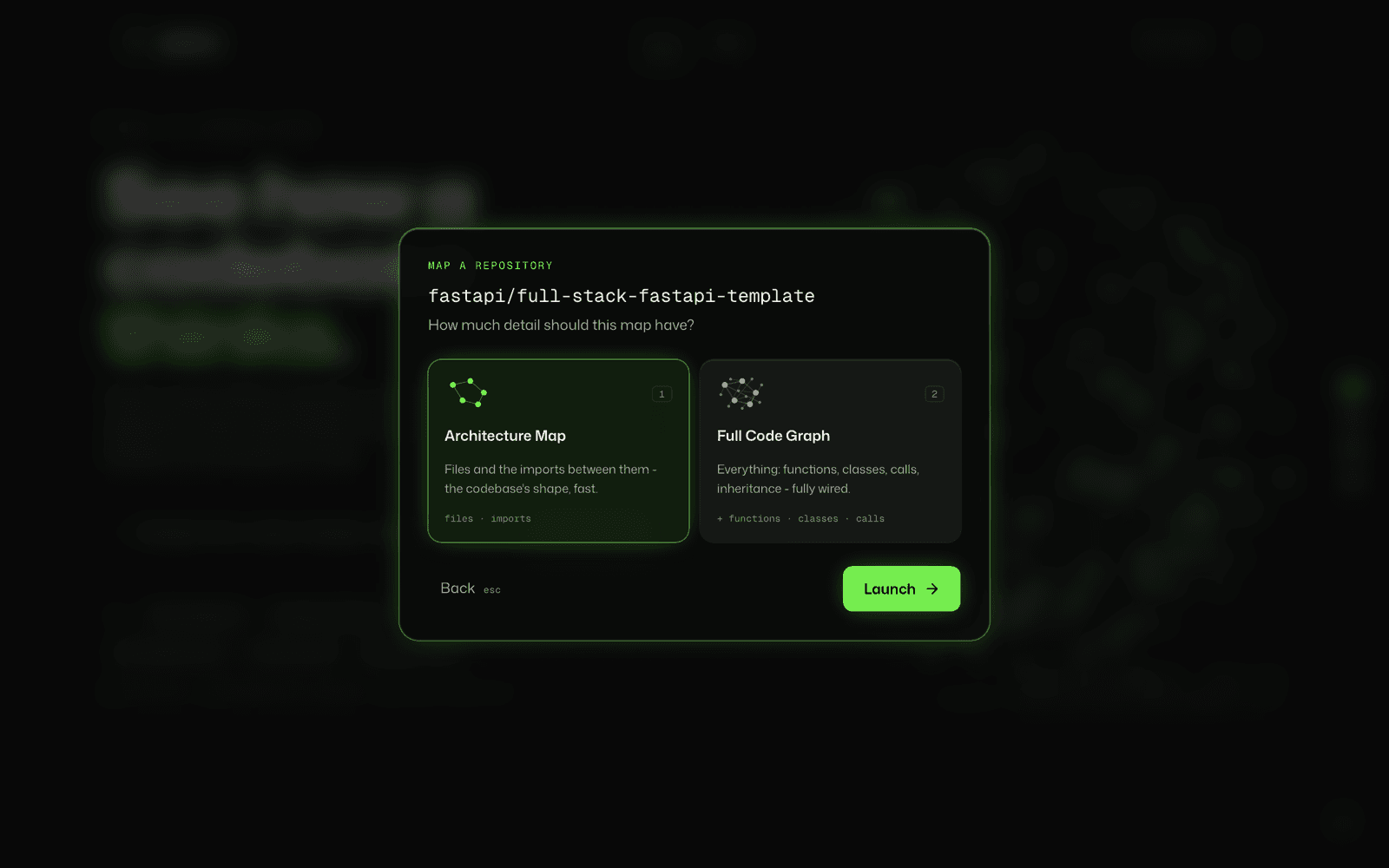
Paste a repository
Typeowner/repo, paste a full URL likehttps://github.com/psf/requests, or a branch or tag URL like…/tree/v2.32.0. Or pick one of the example chips under the box. - 2
Choose how much detail
Architecture Map (press1) for files and imports, or Full Code Graph (press2) for every function, class and call. PressEnterto launch. Nothing starts until you do. - 3
Watch it map, then explore
The scan screen shows each stage with a timer. When it finishes, the explorer opens on the graph. Click any node to start.
Start
Architecture Map or Full Code Graph
Both map the same repository. They differ in how deep the parser goes, and so in how big and how fast the result is.
| Architecture Map | Full Code Graph | |
|---|---|---|
| Shows | Files, folders and the imports between them | Everything in the map, plus functions, classes, calls, inheritance, routes and tests, for Python, JavaScript, TypeScript, Go and Java |
| How it's read | Fetched from GitHub without cloning | Shallow clone, then a full tree-sitter parse |
| File budget | Up to 2,000 files | Up to 6,000 files |
| Best for | Seeing how a codebase is organised, fast | Blast radius, call paths, and reading real code |
You can map the same commit both ways. Each detail level is cached on its own, so switching from the map to the full graph runs a real second pass instead of reusing the first.
Start
The explorer at a glance
One canvas in the middle, with everything else arranged around it so it never covers the graph.
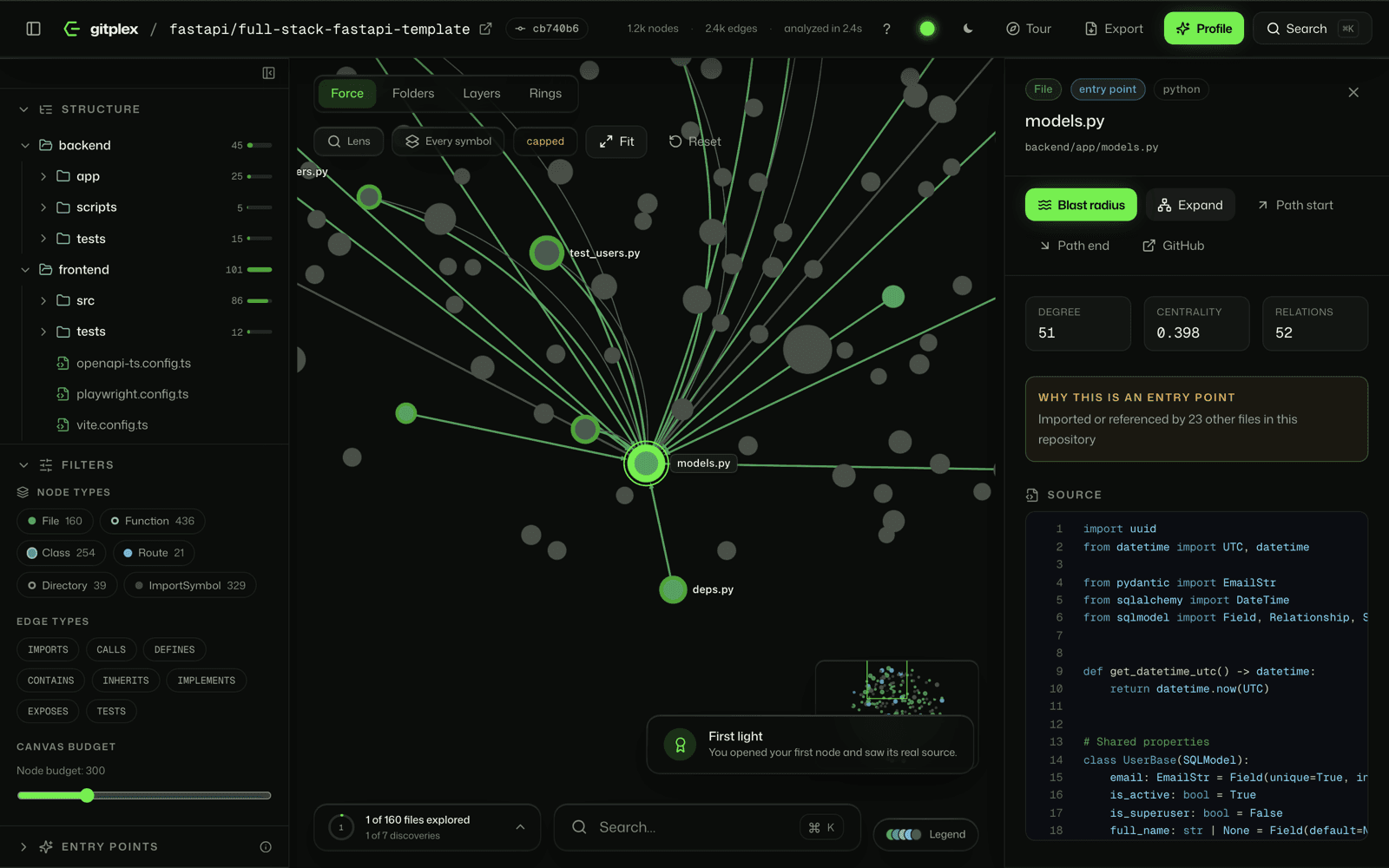
| Area | What it holds |
|---|---|
| Header | The repository and the exact commit it's pinned to, node and edge totals, and Tour, Export, Profile and Search. Accent, theme and shortcuts sit on the right. |
| Left rail | Structure (the file tree), Filters (node and edge types, node budget) and Entry points. |
| Toolbar | Layouts, Lens, the symbols toggle, the capped warning, Fit and Reset. |
| Canvas | The graph. Drag to pan, scroll to zoom, click to select. |
| Inspector | Everything about the selected node: source, metrics, relationships, and actions. On phones and tablets it rises from the bottom as a sheet. |
| Bottom dock | Your exploration progress, a search box and the legend. |
Read the graph
Nodes and edges
Every node type is a tone of your accent colour, told apart by its pattern. Your selection is always the brightest thing on screen.
| Node | Looks like | What it is |
|---|---|---|
| File | Solid | A source file. The backbone of every map. |
| Function | Hollow ring | A function or method. Full Code Graph only. |
| Class | Core with a pale ring | A class, interface or type. Full Code Graph only. |
| Route | Solid, brighter | An HTTP route found from framework conventions. |
| Directory | Hollow, grey | A folder. Shown when a view includes structure. |
| Test | Solid, receded | Test code, dimmed so it never dominates. |
| External import | Small, dark | A package from outside the repository. |
Node size follows centrality: the more of the codebase flows through a node, the bigger it is. An entry point carries an extra ring in the signal colour.
Edges
At rest, every edge is a quiet line so the shape stays readable. Select or hover a node and its edges light up, tinted by type.
| Edge | Means |
|---|---|
IMPORTS | A file imports another file, or an external package. |
CALLS | A function calls another function or constructs a class. |
DEFINES | A file defines a function or class. Structure, not dependency. |
CONTAINS | A directory holds a file, or a class holds a method. |
INHERITS | A class extends another class. |
IMPLEMENTS | A class implements an interface. |
EXPOSES | A route is served by a handler function. |
TESTS | A test file or test function exercises this code. |
Evidence and confidence
Every relationship records how it was found and how sure the parser is. Inferred edges are drawn as thinner curves; direct ones are straight.
| Evidence | Meaning |
|---|---|
ast_direct | Parsed directly from the syntax tree |
import_resolution | Resolved through an import statement |
name_inference | Matched by name - may be ambiguous |
framework_heuristic | Recognised framework convention |
unresolved | Target could not be resolved in this repository |
Read the graph
Layouts
The same graph, arranged four ways. Switch from the toolbar; nothing is re-analysed.
| Layout | Arranges nodes by | Use it to |
|---|---|---|
| Force | Connections pulling related code together | See natural clusters and what sits at the centre |
| Folders | Top-level directory, largest folder in the middle | Compare parts of the repository side by side |
| Layers | Depth from the dependency roots, in rows | Read a codebase top-down, from entry to leaves |
| Rings | How connected each node is, hubs in the middle | Find the few files everything leans on |
Read the graph
Inspecting a node
Click any node, or pick it from search, and the inspector opens with everything gitplex knows about it.
| Section | Shows |
|---|---|
| Badges | Type, language, and whether it's a test or an entry point |
| Actions | Blast radius, Expand, Path start, Path end, and a link to the exact lines on GitHub |
| Metrics | Degree (direct connections), centrality (how much flows through it), and relation count |
| Why this is an entry point | The specific evidence, when the node was flagged as one |
| Documentation | The docstring or leading comment, when there is one |
| Source | The real code, highlighted, with the node's own lines marked |
| Relationships | Every connection grouped by type and direction. Click one to jump there. |
Double-click a node to expand its neighbours onto the canvas. Right-click for more: zoom to it, set it as a path end, or copy a deep link to it.
Read the graph
Structure, filters and the node budget
The left rail is how you narrow a big repository down to the part you care about.
Structure
The repository's folders and files, each with file counts and a bar showing its share of the code. Hover a folder for two actions: scope limits the graph to that folder, and the export icon writes just that folder up as Markdown.
Filters
Toggle node types and edge types on and off. Each chip shows how many of that type the repository has, in the same pattern the canvas uses.
Node budget
How many nodes the canvas draws, from 50 to 1,000 (300 by default). The most important nodes come first. When a view is trimmed, the toolbar shows capped: raise the budget, scope to a folder, or expand a node to see more.
Read the graph
Entry points
Where a person would start reading, found from static evidence only, and always with the reason shown.
gitplex checks package manifests, conventional filenames (main.py, manage.py, asgi.py, cli.py and friends), framework imports, detected routes, and graph centrality. Each hit is ranked, and the inspector tells you exactly why it was chosen. Open the Entry points section in the left rail to jump to one.
Ask it questions
Blast radius: what breaks if I change this?
Pick a node and press Blast radius. A wave travels outward through everything that depends on it, one hop at a time.
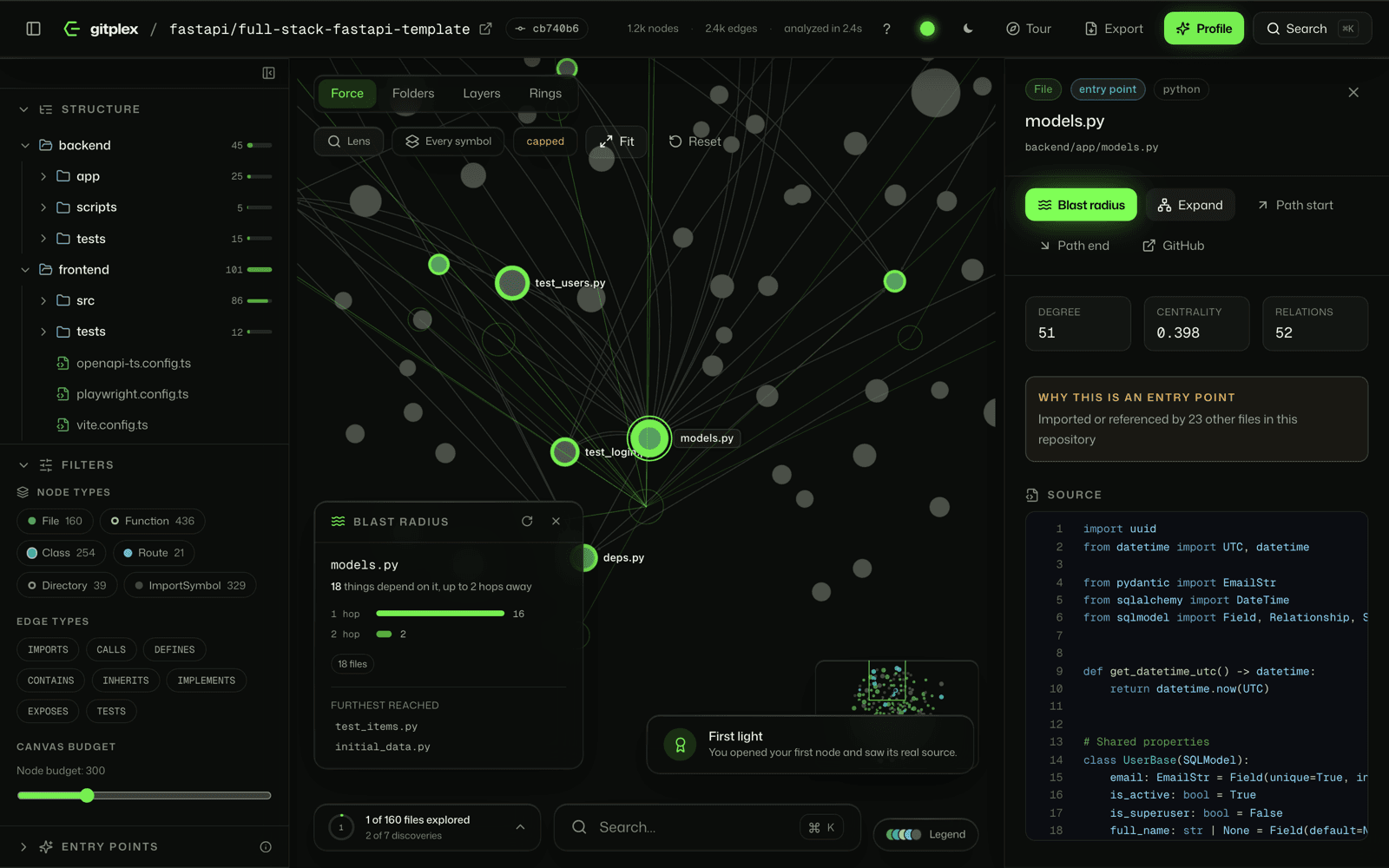
The wave follows real dependencies in reverse: whatever IMPORTS, CALLS, INHERITS, IMPLEMENTS, EXPOSES or TESTS the node, up to three hops out. Structure (DEFINES, CONTAINS) is left out: changing a function doesn't break the folder it lives in.
The readout counts dependents per hop, so you can see how far a change reaches and which code a reviewer should read first. Click empty canvas to clear it.
Press Copy on the readout to take the result with you: Markdown lists every dependent grouped by hop, with its file and line, ready for a pull request or a coding agent; JSON gives the same for scripts.
Ask it questions
Find a path: how does A reach B?
Mark two nodes and gitplex traces the shortest chain of real relationships between them.
- 1
Select the first node
Then press Path start in the inspector, or right-click it and choose Set as path start. - 2
Select the second node
Press Path end. The path lights up on the canvas. - 3
Read the chain
The path panel lists every hop and the relationship that carries it, and the camera frames the route. Copy it as Markdown or JSON, or clear it with ×.
Any two nodes work: a file and a function, a class and a route, two functions. Paths are searched up to six hops, following each edge in either direction, because a real route through code often goes up an import and down a call. Routes through real relationships are preferred; one that only climbs through a shared folder is used when nothing else connects the two.
Ask it questions
Search
Press ⌘K (Ctrl+K on Windows and Linux) from anywhere in the explorer. Search reads inside files, not just their names.
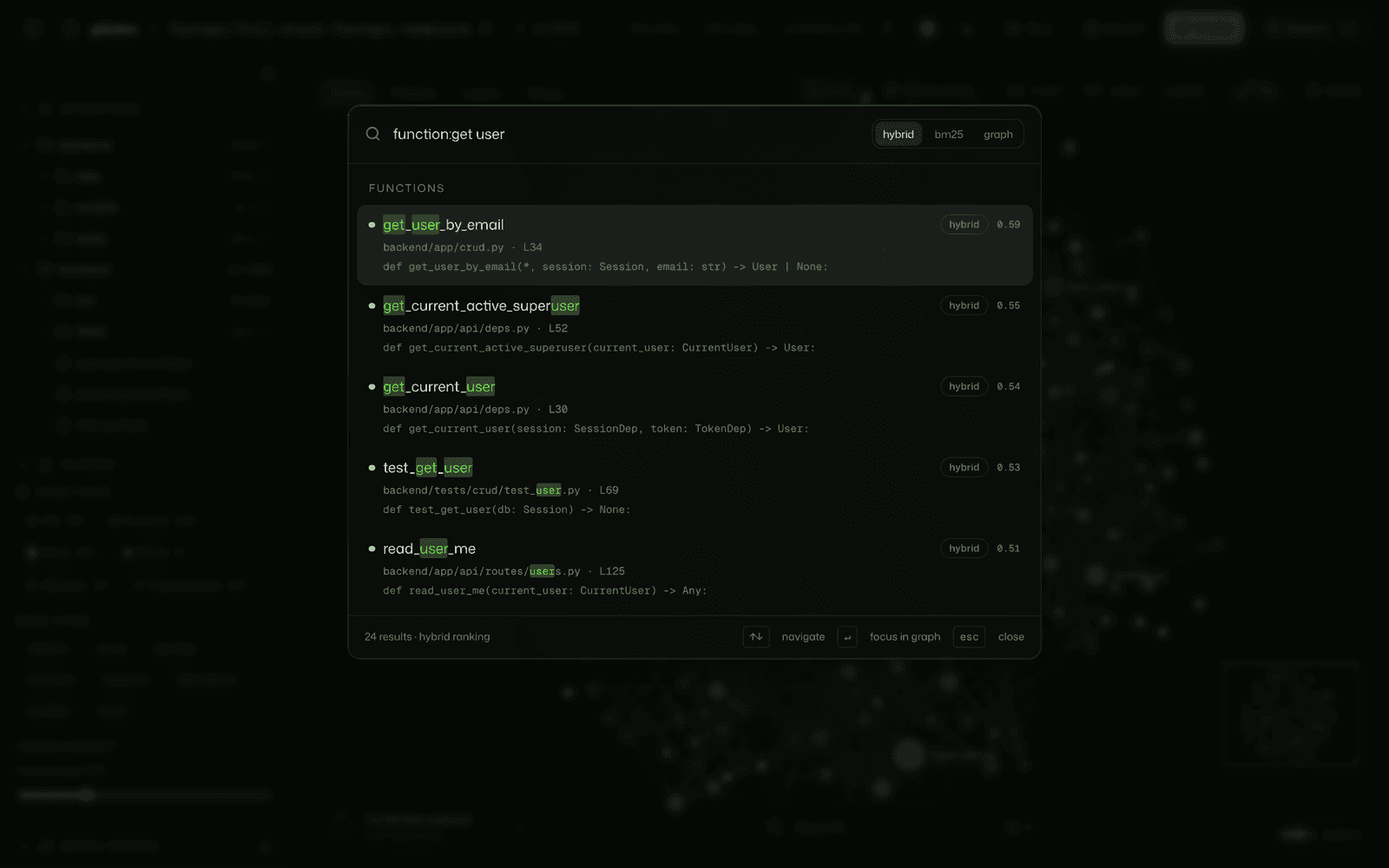
Results come from a BM25 index over names, docstrings and source, combined with what the graph knows: centrality, closeness to an entry point, exact-name matches and test affinity. Each result shows its own score breakdown, so the ranking is something you can check.
Ranking modes
The palette has three modes in its top-right corner. hybrid (the default) blends text relevance with the graph signals. bm25 ranks by text alone, which is best when you know the exact words. graph ranks by structure, putting the most central matching nodes first.
Scope a search with a prefix
| Prefix | Returns only |
|---|---|
file: | Files |
function: | Functions and methods |
class: | Classes and interfaces |
route: | HTTP routes |
test: | Tests |
So function:parse returns only functions, where parse alone also finds matching files.
Ask it questions
The lens
A magnifier for crowded clusters that spreads the nodes under your cursor without losing the rest of the picture.
Hold Z to peek through it, and let go to return. To keep it on, use the Lens button in the toolbar.
Ask it questions
Guided tour
A suggested reading order through the repository, derived from the graph, that flies the camera from stop to stop.
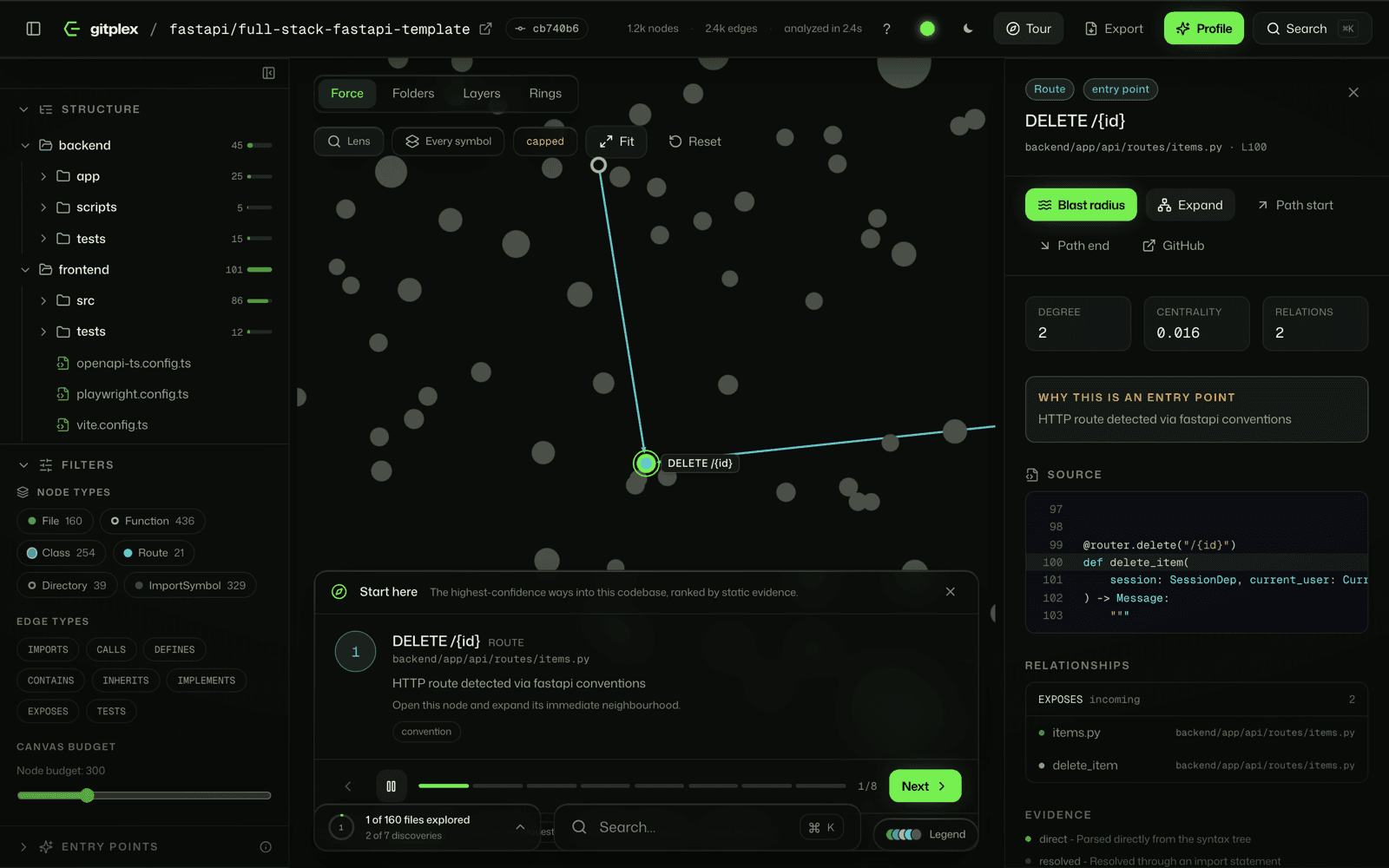
Press Tour in the header. Each stop says what you're looking at and why it was chosen. It plays itself every seven seconds; use ← and → to move, Space to pause, and Esc to leave. Treat it as a suggestion: the order comes from structure, not from the authors.
Ask it questions
Profile, trivia and progress
A character sketch of the codebase, measured from the graph.
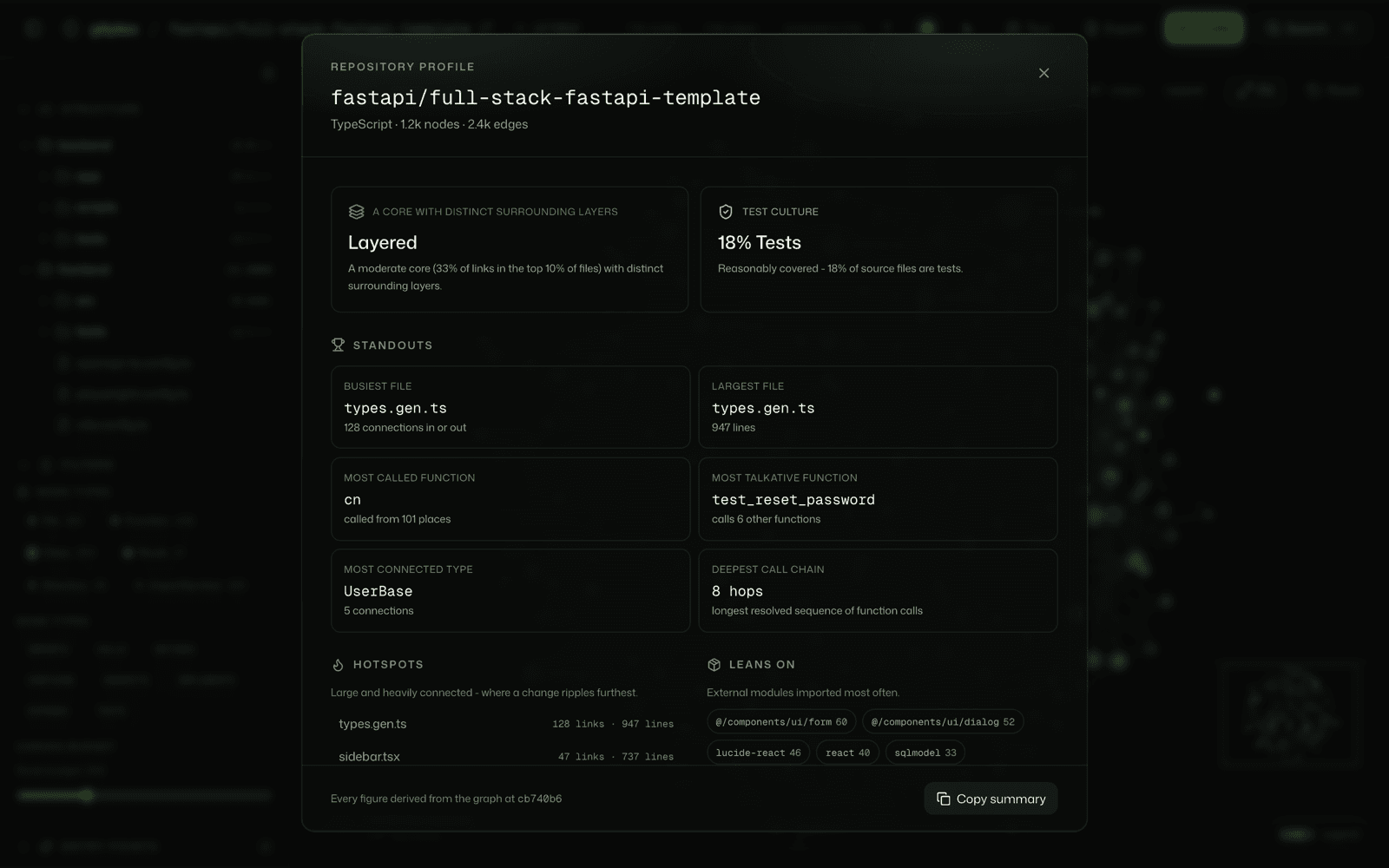
| Part | Tells you |
|---|---|
| Shape | How coupling is spread: hub-and-spoke, layered, evenly woven, or loosely coupled, with the numbers behind it |
| Test culture | The share of test files and a short verdict |
| Standouts | Superlatives like the most-called function and the deepest dependency chain |
| Hotspots | The files most of the code runs through |
| Leans on | The external packages the code imports most |
| Languages | The mix of languages, by file |
Trivia and progress
The progress chip in the bottom-left counts the files you've opened and the discoveries you've made, like your first blast radius or your first path. When you know the place, take the five-question trivia from the same chip; every answer comes from the graph.
Take it with you
Export for coding agents
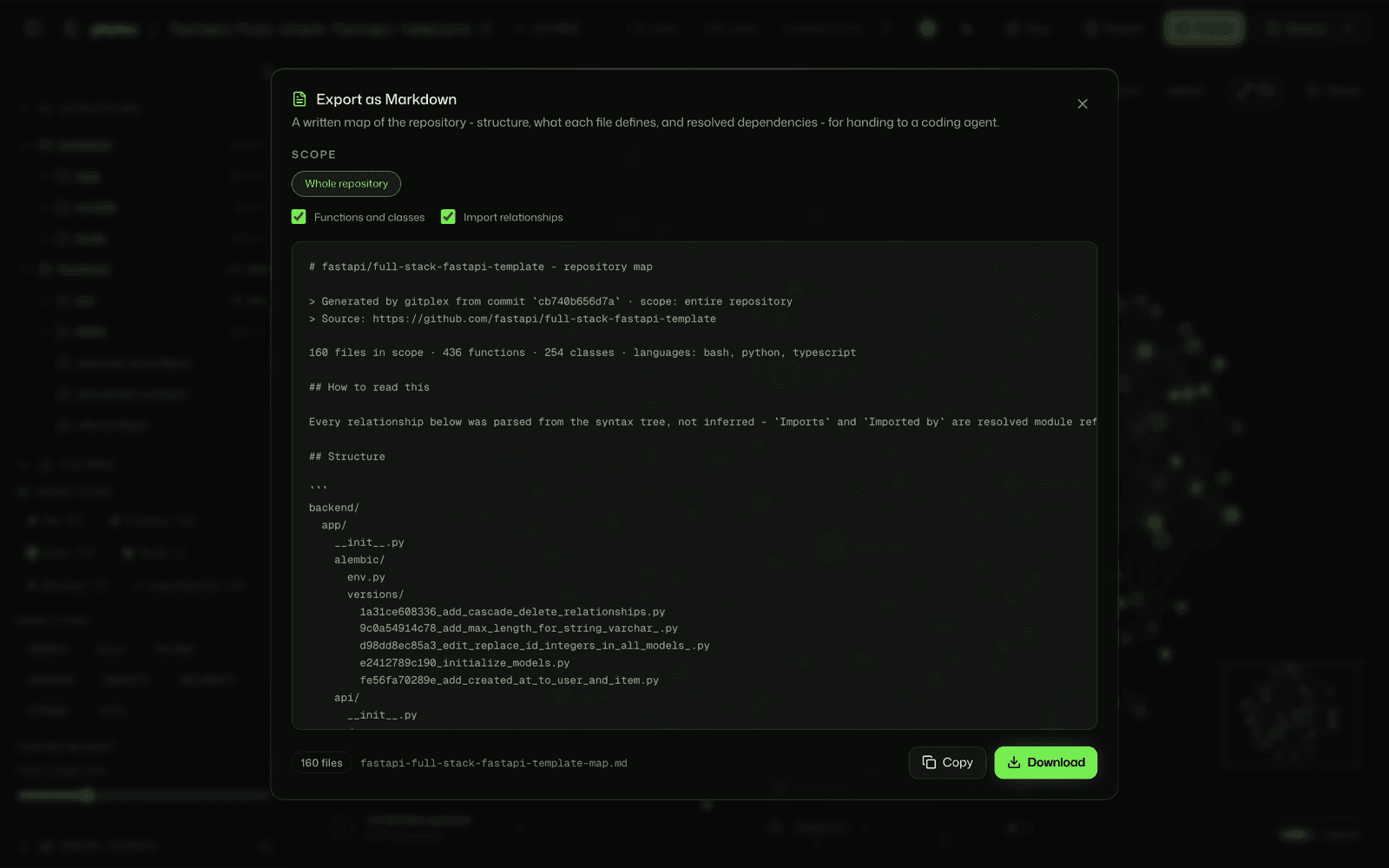
Hand Claude, Cursor or any agent a real map of the codebase, instead of letting it crawl the repository one file at a time.
- 1
Open Export
From the header for the whole repository, or from a folder's export icon in the Structure tree. - 2
Choose what goes in
Keep or drop functions and classes, and import relationships. The preview updates as you change them. - 3
Copy or download
You get one Markdown document with the structure, what each file defines, and how the files depend on each other.
CODEBASE.md at the root of your checkout, or paste it into the agent's context, and ask it to read the map before it starts. Very large scopes are capped; narrow to a folder to get the rest.Take it with you
Themes and accents
Dark by default, light when you want it, and four accent colours.
The moon and sun button switches the theme. The accent bubbles (on the right edge of the site, or in the explorer header) recolour everything that uses the signal colour: buttons, pulses, and the graph's node tones. Choose from four, named after Pokémon types: Grass (parrot green), Psychic (rose), Water (sky blue) and Fire (orange). Both choices are remembered in this browser.
Take it with you
Keyboard shortcuts
Press ? in the explorer to see these any time.
Anywhere in the explorer
- Search files, functions, classes and routes⌘K
- Show these shortcuts?
- Close the open dialog, menu or tourEsc
On the graph
- Select a node and open it in the inspectorClick
- Expand a node's neighbours onto the canvasDouble-click
- Node actions: expand, zoom, path start/end, copy linkRight-click
- Clear the selection and any blast radiusClick empty space
- Peek through the lens to spread a crowded clusterHoldZ
- Zoom around the pointerScroll
Guided tour
- Next stop→
- Previous stop←
- Pause or resume autoplaySpace
Mapping a repository
- Choose Architecture Map1
- Choose Full Code Graph2
- Launch the analysisEnter
Reference
How it works
No model runs at any point. The same commit always produces the same map.
- 01Queued
- 02Cloning repository
- 03Scanning files
- 04Parsing syntax trees
- 05Building the code graph
- 06Building the search index
- 07Deriving entry points
The repository is cloned shallow with no working tree, or read straight from GitHub for an Architecture Map. tree-sitter parses every file, and a per-language extractor walks the syntax tree. Imports, calls and inheritance are either resolved or recorded as unresolved, never guessed, and a call never resolves to code in another language. The graph is stored in FalkorDB, and search is a BM25 index combined with graph signals.
Results are pinned to the exact commit shown in the header and cached by commit and detail level, so mapping a repository twice doesn't redo the work.
Reference
Languages
gitplex reads 32 languages with tree-sitter, in two tiers. The tier decides what you see in the graph.
| Tier | Languages | You get |
|---|---|---|
| Full symbols | Python, JavaScript, TypeScript (including JSX and TSX), Go, Java | Files, functions, classes, routes, calls, inheritance, tests, and imports between files |
| Files and imports | Rust, Kotlin, Swift, C, C++, C#, Ruby, PHP, Scala, Dart, Elixir, Erlang, Haskell, OCaml, Clojure, Julia, Lua, Perl, R, Bash, PowerShell, Groovy, Objective-C, Fortran, Solidity, Zig, Vim script | Files, folders and the imports between them. Blast radius, paths and search still work at file level. |
In a mixed repository each file gets its own language's treatment, so a Python backend with a TypeScript frontend is mapped in full on both sides. A call in one language never resolves to code in another. For a repository in a files-and-imports language, choosing Full Code Graph gives the same graph as the Architecture Map, so pick the map and skip the clone.
Reference
Limits and privacy
| Limit | Value |
|---|---|
| Repositories | Public GitHub repositories only |
| Repository size | Up to 300 MB |
| Files per map | 2,000 for an Architecture Map, 6,000 for a Full Code Graph; larger repositories are ranked and trimmed, not refused |
| Single file | Files over 800 KB are skipped |
| New analyses | 8 per hour from one address; opening a map that already exists doesn't count |
| How long maps last | Graphs are kept for a day after they're last opened |
There are no accounts and no tracking beyond the optional feedback button. Code is read to build the map and isn't sent anywhere else: no language model sees it.
Reference
FAQ
- Which branch does it analyse?
- The repository's default branch, unless you paste a /tree/<branch-or-tag> URL. The commit badge in the header is the exact commit the map is pinned to.
- Why does my Rust, C# or Kotlin repository show only files?
- Those languages are in the files-and-imports tier: gitplex maps the files and what imports what, but doesn't extract functions, classes or calls yet. Python, JavaScript, TypeScript, Go and Java get the full graph.
- Why is a relationship missing?
- It was either unresolvable from the code alone (dynamic imports, reflection, calls through variables), or it's outside the node budget. Check the inspector's relationship list, or raise the budget.
- Why does an edge say inferred?
- It was matched by name rather than proven through an import. It's usually right; the evidence label tells you how much to trust it.
- Can it map private repositories?
- Not today. gitplex only reads public repositories, and it never asks for a token.
- Does search run Cypher queries?
- No. Search is a BM25 index built during analysis and combined with precomputed graph signals. Cypher is used for node lookups, neighbourhoods and paths.
Still stuck? Use the feedback button, or open an issue on GitHub.